 KORYENALocal AI for Windows
Version 2.0.182 · Closed Test · for Windows
An AI for your computer.Simple, private and versatile.
Koryena combines local models with current, proven knowledge. Chat, image generation, voice, documents, 3D printing and business modules work together in a modular interface.
- ✓Local processing as standard
- ✓Automatic hardware selection
- ✓Profile-dependent, tidy navigation
Koryena2.0.182PRIVATE · ON THIS DEVICEHow can I help you?
Message Koryena ...➜
Koryena in image and sound
The most important functions and highlights at a glance.
The compact presentation video in the selected page language shows the most important possibilities of Koryena without getting lost in details. A regular new version is released every five program versions; Playability, download, and content are checked with each release.
- ✓Real footage from Koryena
- ✓Full HD with matching voice output and overlays
- ✓View directly or download as MP4
Video version 2.0.181 · regular rewrite every five releases
Download the presentation videoFull-HDEnglish (UK)MP4 · H.264
Local firstYour content stays on your PC.
Currently on demandSources are checked according to the question.
All in one appText, image, voice, files, and more.
Matching the hardwareModels and performance are automatically adjusted.
Koryena is currently being further developed with test users who have already registered.
Existing installations receive released test updates through the protected application channel. New public installations will not be offered during this phase.
What Koryena can do
Ten understandable areas instead of a long list of modules.
You start with your task. Koryena selects the appropriate local adaptor, incorporates up-to-date knowledge when needed, and keeps all results in a common workflow.
01
Questions & Knowledge
Local chat with cross-session memory. Time-dependent questions are checked via approved online sources if necessary; an explicit photo search shows suitable images including the original source directly in the chat.
Chat · RAG · Live Sources · Photos02
Image Generation & Viewing
Generate, analyse, scan, and translate images. Your own images can be stored via drag-and-drop and edited locally with a prompt; unknown motives are clarified via RAG and documented references.
Image AI · Image Editing · Vision · OCR03
Language & Translation
Local voice input and speech output with freely selectable Windows audio devices, voices and languages. Optionally, Koryena waits locally for the wake word and automatically recognises the end of a request by the pause in speech.
Wake Word · STT · TTS · Translate04
Files & 3D Printing
Process PDF, Office, and OpenDocument files, as well as prepare colour 3D print models with references and recognised printer profiles.
Documents · 3MF · Printing05
Planning & Office
Calendars, crafts as well as trade & freelance connect customers, documents, tax preparation, balance sheets and operating resources. Craft businesses also receive maintenance and plant service, warehouse and purchasing as well as personnel, times and qualifications. The installable mobile companion app only receives expressly selected, password-protected installer or customer data, works offline and only returns changes to Koryena after deliberate re-importation. Business documents remain linked as a traceable chain from quotation to order to invoice. XRechnung 3.0.2 is generated after mandatory field and release check with internal test report; before shipping, the current KoSIT test tool is also recommended.
Calendar · Maintenance · Warehouse · Staff · XRechnung 3.0.206
Media & Desktop
The independent media centre bundles YouTube search, privacy-optimised playback of inserted YouTube links, web TV, web radio and your own media. It remains open independently when the main window is minimised or hidden in the tray. Optional desktop avatars have a matching local voice; their quick chat also works with the main window hidden.
YouTube · Media Center · Avatars · Quick Chat07
Your surface
At least fifteen coordinated themes, freely selectable colours, quick layouts and main areas that can be moved by dragging and dropping Koryena design to suit your way of working. New accessibility features increase the total surface area from 85 to 140 percent, simplify viewing, increase keyboard focus and reduce movement. The main navigation can be sorted and run through completely by keyboard with F6. The five live windows for voice control, personal messages, weather, appointments and system load can be individually adjusted in height; their contents react to the available space and the sizes are saved. When you hover over it, a live map opens free-floating in 150 percent size if desired. This preview can be turned on or off in the accessibility features; the appointment card will only be enlarged for one appointment in the next seven days. News, weather and events open by double-clicking in a suitably large detail window; the date view shows the next seven days. The message window only appears when the function is turned on and interests are selected.
15+ Themes · scalable · Keyboard operable08
Central usage profiles
Personal is the default selection. After a confirmed account link, the Personal, Crafting and Trade & Freelance profiles can be assigned centrally. Koryena checks the signed authorisation regularly; a protected offline status is valid for a maximum of seven days. Profile switching only hides modules and does not delete local data.
Account Bound · signed · offline-capable · No data deletion09
Help & Support
Global help and support centre with local chat and secure ticket delivery. An optional error image is scaled down and re-encoded without camera or location metadata.
Local help · Error pattern · Ticket number · Optional diagnostics10
Personal live information
During installation or later in the settings, you choose your news topics. A saved German zip code adds suitable local and regional news: OpenPLZ only assigns the region, then Koryena loads the official regional feed of tagesschau.de. Without selection or after switching off, the message card remains hidden; Headings open the original message.
Interests · local news by zip code · Weather · Performance data11
Other areas of work
Three additional, separately stored workspaces extend Koryena: Properties & Objects manages objects, transactions and documents; Mobile Services organises stakes, customers, and billing; Dates & Courses bundles offers, bookings and participants. Each area has search, documents, tax work overview, data import and export, and its own backup plans.
Real Estate · Mobile Services · Dates & CoursesKoryena network
Share knowledge directly. Private content stays outside.
Activated Koryena instances find each other in a decentralised manner and exchange only verified, source-based knowledge entries in encrypted form. Anonymous Koryena identifiers replace Windows device names; Remote stations and packet sizes are limited. The central observation point only shows the network status and does not distribute private data.
Find instances
The public observation point confirms the accessibility. After that, the DHT will look for suitable counterparts.
Exchange directly
Signed and sourced entries flow end-to-end encrypted directly between instances.
Check locally
Received knowledge is validated, deduplicated and transferred to one's own knowledge index exactly once.
Never on the Koryena networkChats, files, calendar, tax, balance sheet, trade, trade, trade, freelancer, customer, employee, vehicle, tool, machine, construction site photo, material price, business stationery and payment data, dealer profiles, access data and personal reminders.
View current network status
The story behind Koryena
A personal AI should be yours.
Koryena was born from a simple idea: A helpful AI should work on your computer and adapt to your needs – not the other way around.
"Local first. Currently on demand. Ready for you."
- 01THE BEGINNING
A local chat became a personal assistant.
The first step was to have a private interlocutor. This was followed by language, images, documents and a memory spanning sessions.
- 02THE GROWTH
A modular platform for a wide variety of computers.
Hardware benchmark and interchangeable adaptors ensure that Koryena works just as well on compact PCs as it does on high-performance workstations.
- 03TODAY AND TOMORROW
Expand knowledge without relinquishing control.
Documented content can expand the local body of knowledge and be shared voluntarily via the Koryena network. Private chats, files and access data are left out.
Set up once
Koryena adapts to the computer.
The setup guides you through installation and selection in an understandable way. After that, the integrated update service keeps the program and components up to date.
- 01
Sign Up
For an initial installation, you log in with the accepted tester account and Koryena then takes over the centrally shared profile every time you start it; without special assignment, Personal remains active.
- 02
Install
Select path, optionally save the zip code, select or skip news topics and specify desired components.
- 03
Check
The hardware benchmark evaluates CPU, RAM, GPU and VRAM.
- 04
Customise
Koryena only loads models, engines and avatar profiles that match the computer.
- 05
Stay up-to-date
Program, local components, and knowledge index are updated in a controlled manner. Settings are retained; a status window shows the installation progress.
Performance with temperature protectionKoryena monitors available CPU sensors and automatically throttles or pauses local AI engines before the CPU gets critically hot.
Updates without loss of settingsSmall version intervals only add changed files. If there are more than three version jumps, Koryena will automatically use the full setup.
Private and traceable
Local data and current sources clearly separated.
Koryena makes visible what is running locally and when an online source is needed. Shared knowledge is checked, signed and only transferred to the local index once.
Private content remains private.
- Chats, files, and voice locally
- Encrypted long-term memory
- Calendar, tax and craft data not in the peer network
- Profiles delimit the visible functional areas
Online knowledge with origin.
- Question-related instead of random hits
- Validity period per type of knowledge
- Summary in your own words
- Source and timing remain traceable
Optional desktop companion
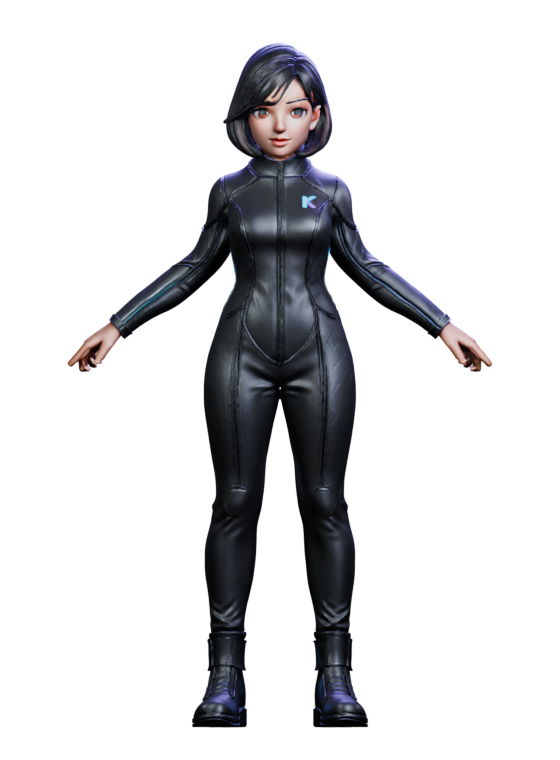
Two new 3D avatars. The appropriate level of detail is selected Koryena.
The new female and male character can speak, listen and move independently across the desktop. Voice, speech and high, medium or low detail depend on your selection and the hardware benchmark.

System Requirements
From compact PCs to high-performance workstations.
A dedicated graphics card is not mandatory for the compact profile. For fast image, vision and 3D work, more RAM and VRAM is worthwhile.
Minimum requirements
- Windows
- 10 22H2 or 11 · 64 bit
- Processor
- 4 Cores / 8 Threads
- Memory
- 8 GB RAM · 20 GB SSD free
- Graphics
- Optional · 4 GB VRAM recommended
Optimal performance
- Windows
- 11 · 64 bit
- Processor
- 12+ Cores / 24 Threads
- Memory
- 48 GB RAM · 45 GB NVMe free
- Graphics
- Dedicated GPU · 16 GB VRAM
Internet is required for initial setup, updates, up-to-date sources, and optional network functions. The setup will show the expected download size and duration before installation.
Koryena 2.0.182 · Closed test
Updates for registered test installations.
The public setup download is disabled during the closed test. Koryena instances that have already been installed and are connected to a confirmed homepage account will automatically receive checked updates in the program.
Briefly answered
Frequently Asked Questions.
The most important points on data protection, offline operation, knowledge and training at a glance.
Can I exchange business data with other software?+
In crafts as well as trade & freelancing, all data tables can be exported as JSON or SQLite and individual tables as CSV. Foreign JSON, CSV/TSV and SQLite tables are imported via a field assignment. Previews, duplicate checks and automatic full backups protect the inventory. Exports are unencrypted and do not contain any credentials or attachments. There is no direct connection to any database server.
Will settings be retained during the update?+
Yes. Individual settings and additional saved options are applied. Necessary runtime paths and validated model migrations can be updated. During the installation, a separate window shows the work step, progress and running time.
Will my data stay on the computer?+
Chats, files, voice, calendars, tax, trade, commercial and freelancer office data, as well as personal memories are processed and stored locally. Online access is intended for current sources, downloads, updates and explicitly activated services. For the optional warning display, only the stored zip code is transmitted for area determination.
Can Koryena organise a craft business?+
Yes. The local craftsman module manages customers, construction sites and encrypted construction site photos, documents, materials, employees, vehicles, working hours, employee calendars as well as tools and machines with inspection intervals. Maintenance contracts and systems reflect service work that is due. Storage locations, inventory-effective postings, and purchase order proposals grouped by vendor support purchasing and material flow. Qualifications, expiration warnings and absences complement personnel planning. New prices of active assets are automatically transferred to the balance sheet work overview. Scanned test certificates and PDF, image, text or Office logs are stored Windows-encrypted for each device and included in the backup. Invoices support cash discounts and show wages including VAT separately. Offer, order, confirmed work certificate and invoice remain clearly linked. After a mandatory field and human approval check, XRechnung 3.0.2 creates Koryena with an internal test report and an unsent e-mail draft.
What does Koryena offer for retailers and freelancers?+
The separately encrypted business office manages customers, products and services, offers, orders, invoices, reminders, payments, receipts, operating resources and company data. Quotation, order and invoice can be continued as a traceable document chain; The order and invoice can be prepared as an unsent draft e-mail. Invoices receive an XRechnung 3.0.2 including an internal test report after mandatory field and release check. The joint balance sheet work summary shows assets, liabilities, profit for the period, difference and local export. Active new tool prices automatically flow into the balance sheet in both offices. Documents can be searched; Invoices, receipts, and manual receipts automatically flow into a local tax work summary without double posting. It does not replace tax advice or direct ELSTER transmission.
What additional work areas are there?+
Real Estate & Objects supports property management, operations, contacts, documents and billing. Mobile Services plans field assignments with customers, employees, status and proof of performance. Appointments & Courses manages offers, bookings, participants and billing. All three areas store separately and encrypted, support search, tax work overview, document export, JSON, CSV and SQLite data exchange, and full and incremental backup plans.
Does Koryena work without the Internet?+
Once set up, the core local features work offline. Daily updated information, weather, traffic, source research, network functions and updates need a connection.
How does Koryena keep knowledge up-to-date?+
Before answering, Koryena checks the local RAG index and the validity period of the knowledge. Expired or missing content can be renewed, occupied, deduplicated, and saved for later sessions via shared sources.
How do I contact Koryena support?+
The global help and support desk is accessible regardless of the selected usage profile. You can first ask the local Koryena chat for help or send a ticket with a category, subject, description, optional reply address, and an explicitly selected error pattern. The image is bounded, scaled down, and re-encoded without camera or location metadata. The dispatch uses the same protected settings on the server side as the service mail. Passwords, chat histories, and customer documents aren't automatically transferred. A sanitised system diagnostics will only be included in encrypted form after your explicit consent.